Sales Funnel
The Sales Funnel shows how your opportunities and quotations progress, where they stall, and why they're lost.
Who can see it: Everyone. The Owner, Admins and Staff with the Reports & activity permission see the whole company. Other staff see only the opportunities assigned to them, and the page is called My Funnel.
Open it from Reports → Sales Funnel in the menu.
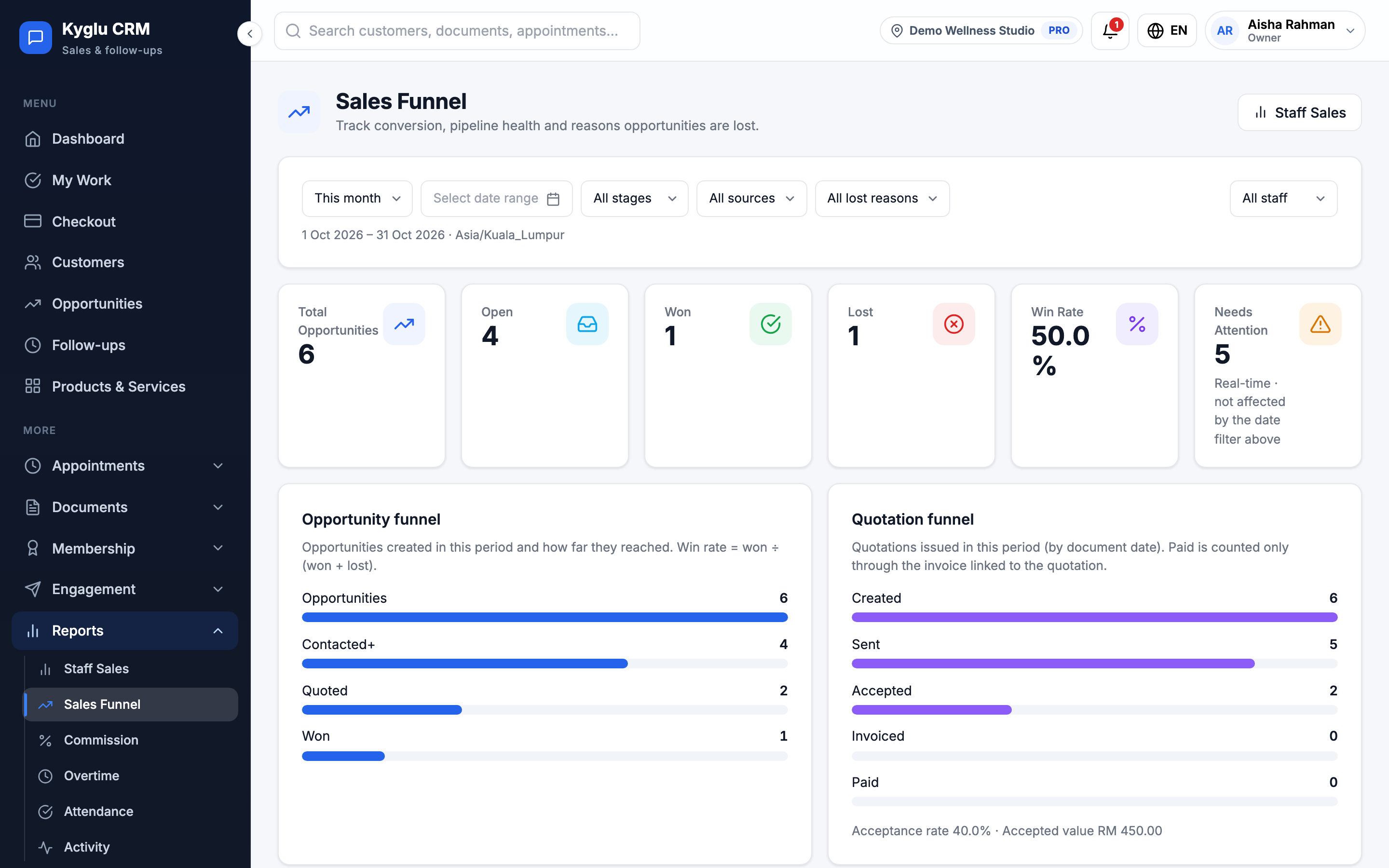
Filters
- Dates: Today, This week, This month, Last month or Custom
- Stage, Source and Lost reason
- Staff (whole-company view only): All staff, one person, or Unassigned
Summary
| Figure | Meaning |
|---|---|
| Total Opportunities | Opportunities created in the selected dates |
| Open, Won, Lost | How many of them are at each point now |
| Win Rate | Won ÷ (won + lost). Opportunities still open don't count. |
| Needs Attention | Opportunities and quotations that need action now |
Opportunity funnel
The opportunities created in the selected dates, and how far each one got: Opportunities → Contacted+ → Quoted → Won.
The funnel counts the furthest stage an opportunity ever reached, not just where it is now. Opportunities created before stage tracking began may show only partly. The page tells you how many.
Quotation funnel
The quotations issued in the selected dates, by document date: Created → Sent → Accepted → Invoiced → Paid. It also shows the acceptance rate and accepted value.
Paid counts only quotations whose linked invoice has been paid.
Quotations aren't linked to opportunities, so the two funnels are shown side by side. Don't multiply them together.
Lost reasons
Opportunity lost reasons and Quotation rejection reasons show why things were lost in the selected dates. Staff choose a reason whenever they mark an opportunity lost or reject a quotation, so these lists are only as good as the reasons chosen.
Pipeline health
A live snapshot of what needs attention. It doesn't follow the date filter.
| Row | Rule |
|---|---|
| Untouched opportunities | New, no follow-up, and over 24 hours old |
| Stale opportunities | Past New, but no activity for 3 days |
| Overdue follow-ups | Follow-ups past their due time |
| Ageing (warning) / Ageing (critical) | More than 7 / 14 days in the same stage |
| Quotations awaiting reply | Sent over 3 days ago, with no answer and no invoice |
| Accepted not invoiced | Accepted quotations not yet billed |
| Lost without a reason | Older lost opportunities recorded without a reason |
The overall status is Healthy, Needs attention, or At risk when there are overdue follow-ups or opportunities stuck in a stage for over 14 days.
Stage aging
The average time open opportunities have spent in their current stage, and the ones that have been stuck longest.
Opportunities needing attention
A list of the opportunities and quotations that need action, each with the reason and a suggested next step, for example Reach out for the first time or Create the invoice. Click one to open it.
These use the same rules as My Work and Automation.